


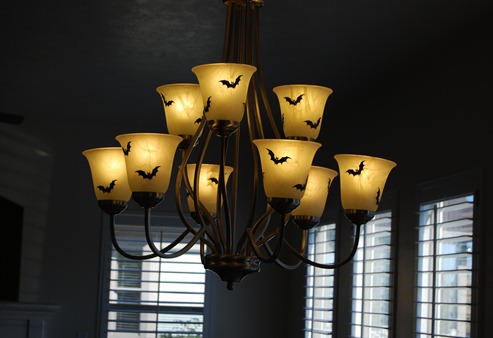
Light Fixture Makeover: Spooky, Quick, & Temporary

The folks at Silhouette also sent me a roll of their black vinyl. I hadn’t actually used it…until this morning.

I downloaded a bat from their online store and then tiled 21 of them to a page.

Fullscreen capture 9232010 111933 AM

I cut out 2 pages worth and then just started sticking!
DSC_0295

It probably took me 15 minutes tops.

DSC_0299

And once Halloween’s over? I’ll just peel ‘em off.

DSC_0303

Please follow and like us:

A few more things you can do with a Silhouette

(And poorly photograph, too!)

You can entertain a couple of 10-11 year olds with a certain meat obsession.

IMG00242

Or, you can have a Saved By The Bell marathon with a couple of your favorite teenagers and make these:

DSC_0813

The lettering is heat transfer from Silhouette. The font is Keep On Truckin’. The technique for the glittery heart came from the cover of this month’s Family Fun magazine. Go here to see how!

Please follow and like us:

2 Seam Tutu

***Don’t forget to enter to win your very own Silhouette machine here!***

I know there are “no sew” tutus out there and if you *really* don’t want to sew, they’re great. At my house, they end up being a tangled mess in the bottom of the dress up box, though.

What you’ll need:

DSC_0738

2-4 yards of tulle. 2 yards is good if you’re using it for an overskirt. 4 or more yards is better for a stand alone tutu.

Elastic. I used 1” black because my tulle was black and the skirt I’m putting it over is also black.

Rotary cutter, ruler, and mat

Silhouette cutting machine and white flocked heat transfer (optional)

Your tulle *should* have a crease in it from the bolt. It’s probably wonky, though, so the first thing we’re going to do is re-press the center crease all the way down the length of the tulle.

DSC_0739

I use a wool setting and lots of steam.

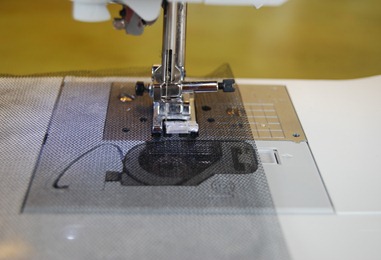
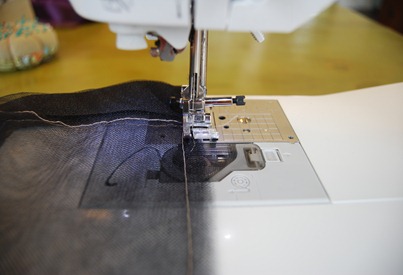
Sew (seam #1) down the entire length of the tulle 1.25” from the folded edge. (This is for 1” elastic. If you’re using another size, you’ll need to adjust the width of your casing.)

DSC_0740

I’m using contrasting thread for demonstration purposes. I’d suggest you use some that matches. ;)

DSC_0741

And there’s our casing.

Next we’re going to cut our tutu to the appropriate length.

Fold and stack your tulle, lining the waistband edges up neatly.

DSC_0742

Determine what you want your finished length to be. I’m using 21”.

DSC_0743

And cut it off.
DSC_0746

Thread your elastic through the casing and get ready for seam #2.

Match up both ends of the tutu and sew a 1/4” seam along the edge. Be sure to catch both pieces of elastic!

DSC_0747

If you want (although this is *technically* a 3rd seam), sew down the length of the seam again about 1/8” from your initial stitching.

DSC_0748

Trim close to the 2nd line of stitching.

Now for the fun part!

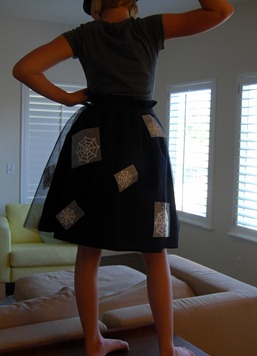
I used my Silhouette software and the spider web design that came with it. I tiled 4 to a page and then 9 to page and cut them out on white flocked heat transfer.

DSC_0749DSC_0750

I cut them apart and peeled off the excess heat transfer material. And then to determine where I wanted them, I used a really fancy method…I had Macy try on the tutu and pinned them all over.

DSC_0549

Once I was satisfied with the placement, it was time to iron them on.

Since the tulle is full of holes, I put a scrap of fabric underneath to protect my ironing board.

DSC_0550

Feel free to use fabric slightly less ugly.

I fused the heat transfer, following the directions on the package. Then, I immediately lifted the tulle off of the scrap fabric, just to make sure it didn’t stick. I found that the plastic backing comes off the designs more easily if you allow it to cool a bit.

DSC_0588

Please follow and like us:

It draws too!

The nice folks at Silhouette also sent me some of their sketch pens to try.

DSC_0630

I heard they also come in metallic.

The first set didn’t work properly (big globs of ink in some spots, nothing at all in others). I called customer service and had a new set within a few days. They worked perfectly.

You pick your designs (the online store has tons of sketch options).

DSC_0623

Then put one of the sketch pens in the blade holder.

DSC_0625

Choose “pen” on the cutting menu.

DSC_0624

And let the Silhouette do the rest!

DSC_0628

We’ve had a blank space above our bed for YEARS. No more, baby!

DSC_0617

Don’t forget to enter to win your very own Silhouette machine here!

Please follow and like us:

The moment you’ve all been waiting for…

***CLOSED***

It’s here.

And I’m LOVING it.

My box arrived right as I was heading out the door to girls camp. And I totally wanted to stay home to play with it. I even thought about faking sick/injured and making them all a “Hope you had fun at camp without me!” card.

Darn conscience.

I guess it’s a good thing I went to camp because although there are A LOT of card making possibilities,

I didn’t really see anything that fit. Weird. ;)

Some of you may know that I retired from scrapbooking about 10 years ago (and by “retired” I mean “quit because I was so far behind and I kind of sucked at it anyway”). I think if I’d had the Silhouette I might still be scrappin’.

Did you know you can download designs instantly from Silhouette’s online store??? And they’re CHEAP…as in 99 cents per download (and less than that if you buy a subscription — as low as 14 cents!). Why spend $40 or more for a cartridge full of stuff you won’t use when all you really need is a ____________ ?

Remember that time I threw a cupcake birthday party for Macy? I thought about getting some of those darling cupcake wrappers, but I waited so long I was out of options. If I’d had my Silhouette then….

papercraft

I’d have won Mother of the Year for sure.

And Silhouette has a blog! You’ll find TONS of great project ideas:

You’ll also find a FREE download every.single.week!

What did I make first with my Silhouette?

Since I’m a fabric lover, I went straight for the heat transfer.

Since I have a lot of boys, I went straight for this:

biohazard

It turned out great, see?

DSC_0605

So, what’s in it for you?

That’s what.

One lucky Crap I’ve Made reader (who lives in the U.S.) will win:

A Silhouette Machine
(a $299.99 value)

Including:

Silhouette machine
Software for Windows XP/Vista
Power cable, USB cable
2 Cutting mats (one for thick media, one for thin media)
One cutting blade
$10 gift card to the Silhouette Online Store

HOW TO ENTER:

Click on the Silhouette machine picture below (or above…whichever…I’m easy) to visit the Silhouette site.

Take a look at all the magic you can work with the Silhouette.

Come back here and leave a comment ON THIS POST saying what the first project you’d make with your Silhouette would be.

***Giveaway closes on Tuesday, August 31st at noon (Utah time). Winner will be announced immediately after!***

Not feeling especially lucky?

Silhouette is offering ALL of you the following deals (use code “craft” at checkout and the extras will automatically be added to your cart):

1) AWESOME PROMO (running from August 23rd through September 1st at midnight)
Buy a machine and receive the following:

$50 off the Silhouette Craft Cutter
Fuzzy white vinyl (valued at $7.99)
Light blue smooth heat transfer (valued at 14.99)
Yellow flocked heat transfer (valued at $14.99)
Home Décor CD (valued at $50)
$10 Gift Card to the Silhouette Download Store (comes in the box)Cutting Blade (comes in the box)
2 Cutting Mats (comes in the box)

All for $249.99
(a savings of $137.97)

Just think of how much you’ll save on gift giving this year!

2) GOOD PROMO (running from September 2nd through September 4th at midnight)
Buy a machine and receive the following:

$50 off the Silhouette Craft Cutter
2 rolls of Heat transfer ($29.89 value)
$10 Gift Card to the Silhouette Download Store(comes in the box)
Cutting Blade (comes in the box)
2 Cutting Mats(comes in the box)

All for $249.99
(a savings of $79.98)

Stay tuned for more Silhouette projects all week long!

***FTC disclosure: Silhouette provided me with a free machine to use and review. They are also providing the free machine to the winner of this giveaway.***

Please follow and like us:

Creative Commons License
Crap I've Made by Char is licensed under a Creative Commons Attribution-Noncommercial-Share Alike 3.0 United States License.
Based on a work at www.crapivemade.blogspot.com.
Permissions beyond the scope of this license may be available at www.crapivemade.blogspot.com.

MyFreeCopyright.com Registered & Protected
BLOG DESIGN BY: